1dictation
hold a key, talk, and it types.
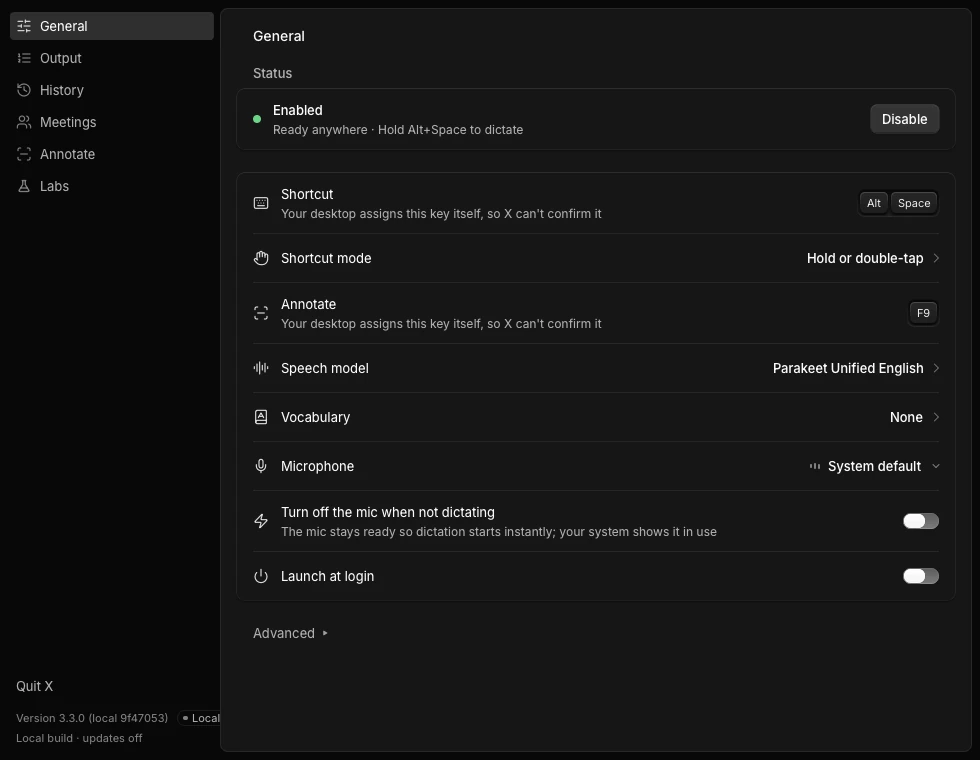
x is a fork of hex, the local dictation app. the speech model runs on your own machine, on the gpu when vulkan is there and on the cpu when it isn't.
it works in any app: browser, editor, chat, terminal. hold the shortcut and let go, or tap it to toggle. the text is pasted where your cursor is.
the first run downloads a model. after that your voice never leaves the computer, and a name list in vocabulary helps the models that read it (the picker marks which).
2the agent
say a word, and it does things.
on top of dictation there's an agent. it's off until you turn on the labs switch. start a sentence with your wake word (friday by default, or any single word you pick) and x treats it as a command instead of text.
it can open apps, search, switch workspaces, start opencode in a fresh folder, and operate a browser you've allowed. for browser work it reads the page through the accessibility tree, acts, and only says done when it can see the result.
page text is data, not orders. it can't leave its list of steps, and it never types into password fields or presses send, buy or delete.
3speech models
pick the one that fits how you talk.
parakeet writes while you speak, so there is no wait after you let go. cohere transcribe has the fewest wrong words. whisper large-v3-turbo covers 41 languages and reads your vocabulary list.
the model picker shows the wait, the error rate and the languages for each one before you download anything. there are more in the list, and you can add your own gguf file.
4installation
arch first. one script, or the aur.
x86_64 only for now. i've only run it on arch with hyprland, so treat other setups as untested.
git clone https://github.com/0xQuerencia/x && cd x
./scripts/install-arch.sh
systemctl --user enable --now x.service
x labs on x-agent   # only if you want the agent
# package files are in packaging/aur-x
cd packaging/aur-x && makepkg -si
sha256sum x-0.1.0-alpha.1-linux-x64
# compare with the .sha256 file on the release
x keeps its own data in ~/.local/share/x and runs as x.service, so it can sit beside a normal hex install. bind your dictation key to x dictation toggle.
5what you get
what it can do today.
- local speech to text, pasted into any app
- hold-to-talk or tap-to-toggle, on a shortcut you choose
- a vocabulary list, and a history you can clear
- nothing is sent anywhere for transcription
- open and switch apps, jump workspaces on hyprland
- start opencode in a fresh folder
- click, type and navigate in a browser you've granted
- done means it saw the result on screen
- risky steps ask first, and a stop button always works
6voice
talk normally. say a word for more.
speech without the wake word is just typed, so nothing runs by accident. set your own with x agent wake set jarvis.
| you say | x does |
|---|---|
| meet me at noon, i'll bring the notes | types exactly that |
| friday open firefox | launches firefox |
| friday search youtube for mars rover | opens the search in your browser |
| friday go to workspace 3 | switches workspace and confirms it |
| friday work fix the failing tests | runs opencode on your project, with approval |
| friday go to example dot org in chromium | navigates, then looks for the page to prove it |
a closer look
frequently asked questions
1does my voice go to the cloud?
no. transcription runs on your machine. after the first model download it works offline. only if you use the optional agent does a sentence go to a planner model, and you choose that model. an ollama model keeps even that local.
2how good is the transcription?
it depends on the model. the picker in the app lists each one's wait, wrong-word rate and languages from hex's own measurements. i haven't run my own benchmark, so check the picker for your language.
3which languages work?
the default, parakeet unified, is english. the picker shows cohere transcribe with 14 languages and whisper large-v3-turbo with 41, plus more models in the list.
4do i have to use the agent?
no. the agent is off until you turn on the labs switch. without it x is a dictation app, the same as hex.
5how do i pick my own wake word?
run x agent wake set jarvis with any single word, or add a second one. x agent wake list shows what's set.
6what can the browser part see?
window titles, button and link names, and page text, read through accessibility. never passwords or form values. that text goes only to a model on your own machine unless you switch on x agent computer remote on.
7is this a finished release?
no. it's an alpha. the pieces were tested one by one on a single machine.
8which systems does it run on?
linux, x86_64. i built and tested it on arch with hyprland. there are no mac or windows builds of x.
9how is it related to hex?
x is a fork. hex's local dictation is the base, and x adds the agent on top. both can be installed together because x keeps its own folders.
10how do i stop the agent mid-task?
press stop in the agent pane or run x agent stop. browser tasks also end themselves after fifteen steps, three errors or three minutes.
stop typing what you can just say
download for linuxx is free, mit licensed